Going into 2026 with the Radxa Dragon Q6A - Full Review
 Sunday, 18 January 2026 - 23:00
Estimated reading time: 9 minutes
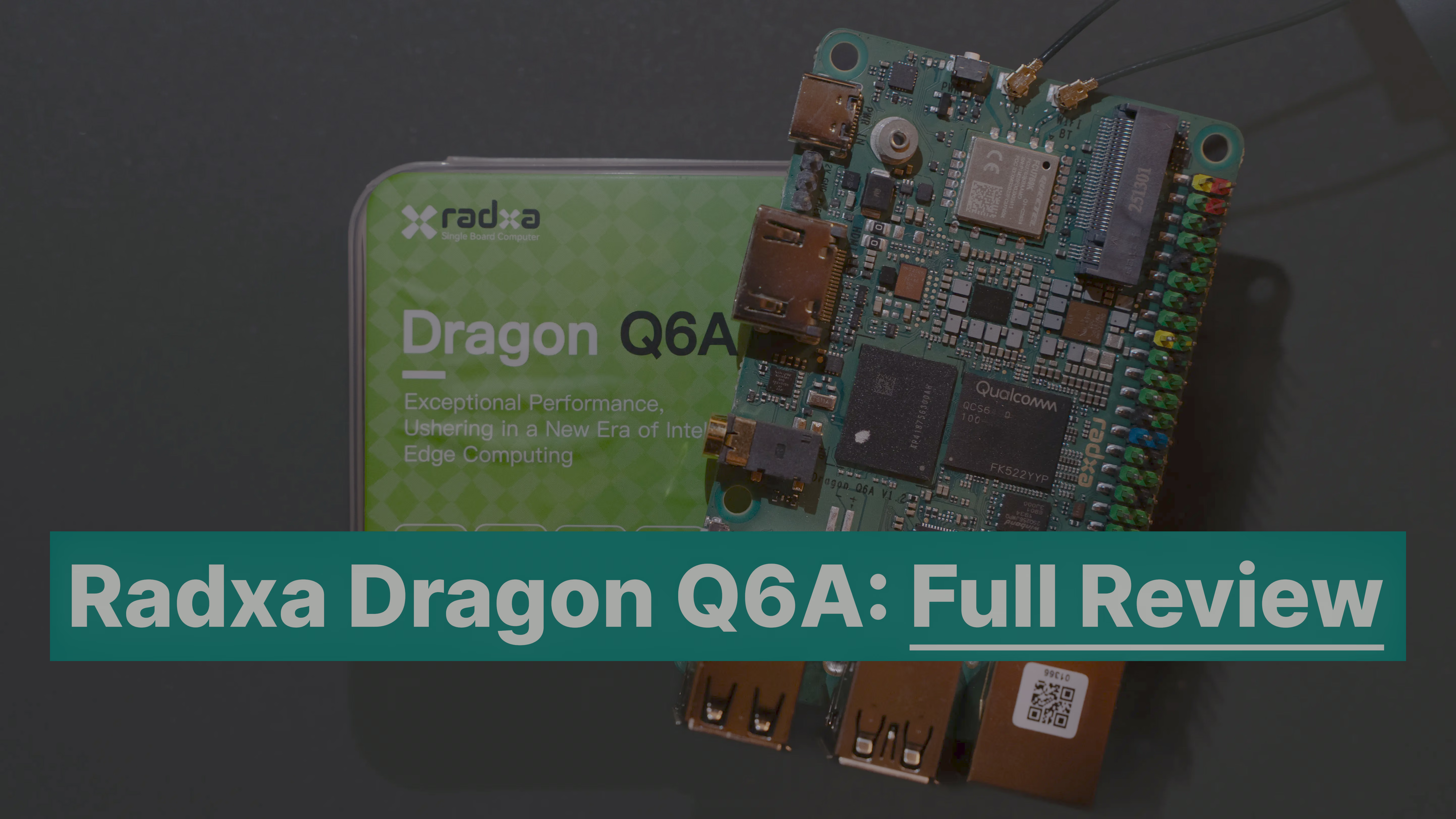
Going into 2026 with the Radxa Dragon Q6A - Full Review#
Happy New Year, dear readers! Be ready for more in-depth reviews and stories all around SBCs this year on SBCwiki. After doing our First Look article on the Radxa Dragon Q6A I worked on bringing up Armbian support as well as started working on a broad testsuite to showcase how SBCs perform, highlight their strengths and shortcomings, and compare them with each other. My focus is mostly on Desktop-Style usage including Gaming / Emulation performance, daily driveability with things like hardware accelerated Video Playback and more. This article will be the first to make use of this testsuite and I can tell one thing from the start: this board’s price-to-performance and software support is amazing, and when you consider its low power usage at load, this gives its competitors a run for their money.
Overview#
When I received the Q6A back in September I quickly realised this SBC is different. At that time the price was not set yet and competitors like the RubikPi based on the same SoC were sparse. And that’s before looking at their prices in the >150€ range. I fully expected the board to land in the same price region between 150-200€ given its main difference to the likes of Rockchip’s RK3588 is that it has had proper upstream Linux support for the past two years. But only now Qualcomm seems to feel confident enough to market this chip to the same audience that Raspberry Pi targets. Radxa isn’t a no-name brand either as they have been leading the SBC market as a first mover with their offerings, therefore making this collaboration with Qualcomm not that unusual but rather unexpected since their price ranges would differ by quite some margin in the category. I was surprised to see that my initial expectation was beaten with the 8GB DDR5 variant now selling for 69.95€.
Software#
As I was writing the First Look article I was working on bringing up support for the Dragon Q6A to Armbian and parallel to that another core developer Amazingfate was also working on that too with our efforts combined landing the first non-vendor operating system based on top of Linux 6.18. During my initial testing I noticed some bugs, one involving the GRUB bootloader that was quickly fixed by Radxa even though Qualcomm uses SystemD-Boot in their own software offering. Then another when doing my hardware accelerated video playback tests where Qualcomm was at fault but even that was resolved upstream after reporting it to the right people there. With that fix also applied to Armbian I was ready to give this one a fair trial, now let’s see how it scores:
CPU Test#
- GeekBench6
- Single-Core Score: 1170
- Multi-Core Score: 3105
Geekbench 6 CPU
GPU Test#
All of the following tests were run with Mesa 25.2.6-1 from Debian Trixie-Backports.
GFXbench (Gaming benchmark)#
- Aztec High (Vulkan 5 High) -
Wayland on-screen at 1920x1080 resolution
VULKAN_5_HIGH
- Aztec Normal (Vulkan 5 Normal) -
Wayland on-screen at 1920x1080 resolution
VULKAN_5_NORMAL
- Manhattan31 -
EGL at 1920x1080 resolution
GL_MANHATTAN31
Geekbench6 GPU (Compute Benchmark)#
The MESA driver uses RustiCL (OpenCL over Vulkan) with Freedreno and it seems like this GPU path is not optimised enough yet as it performs worse than other GPUs it beats. During the testing there were multiple warnings from the driver that optimizations have failed. Anyways these are the results:
- OpenCL Score: 2105
Geekbench 6 GPU - OpenCL
NPU / AI Tests#
Here I could run a bunch of tests but Anton Maltsev has done an amazing writeup where he put this board to its paces. You can find his article here: Radxa Dragon Q6A: A Surprisingly Capable Qualcomm-Powered SBC for Edge AI
Desktop usage#
Video Playback with: Chromium, Firefox & MPV#
This is a category where I might even have to say this is a first throughout all the SBCs I have tested. With the upstream venus VPU driver this board “just” works under Debian.. Well it soon will with upstream Linux 6.19. During my initial testing I discovered a bug in the way the VP9 codec (used widely by sites like YouTube) decoding was handled leading to crashes. After reporting that bug to Qualcomm they sent in a fix which I have also backported to Armbian and now we have smooth 4k60 playback with H264 / H265 & VP9 using v4l2-m2m.
Power consumption#
The QCS6490 was made in a 6nm process and this shows positively here. After doing all the benchmarks the peak power usage under Linux reported by my USB-C PD power meter was: 10.17 watts. Only CPU loads usually make it hover around 6w and utilizing both CPU and GPU made it hit the 10w mark. Overall these are really great results especially if you consider that the board is connected via HDMI to a 1440P monitor, 1Gb Ethernet, USB Mouse and Keyboard and a fan that alone makes up for roughly 1.5-2w.
But what about Windows 11 on Arm?#
Windows you say? Well yes this SoC has one last trick up its sleeve and that is that it can not only run Linux but Windows bare metal too. Everyone knows the Qualcomm X Elite by now and people in the embedded space probably have encountered systems running Windows 10 IoT with the like of NXP iMX SoCs but here we just download the regular arm64 ISO from Microsoft’s Website, flash it to a USB stick and boot from it - Almost. At the time of writing WoA requires a specialized BIOS build but then the regular steps to install Windows actually apply. No prebuilt image that never gets updated with drivers out of unobtainium behind NDAs.
So what can we do with this now?
Desktop usage on Windows 11 25H2#
Edge / Chrome:#
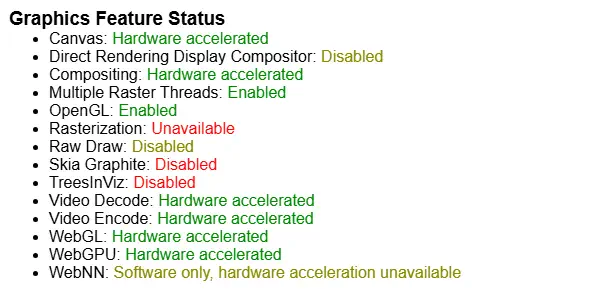
- The Browser is hardware accelerated for the GPU and playing Videos on YouTube also runs smooth with audio working over HDMI.
Office 365:#
- Word, Excel and PowerPoint run as expected.
Video acceleration:#
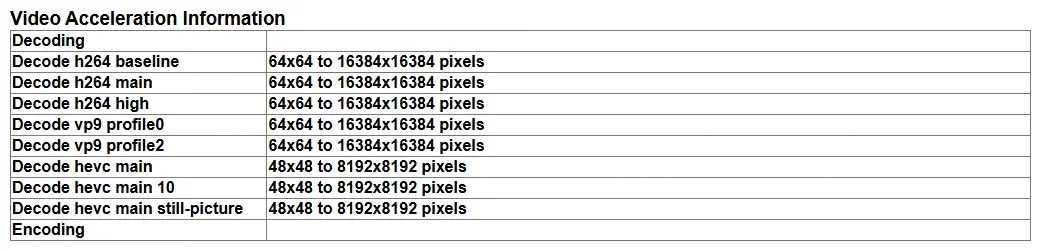
- Is handled by the Microsoft MediaFoundation API meaning as long as the application supports it you will have hardware video acceleration.
OBS-Studio:#
- Has a community build with MediaFoundation support so there is nothing in the way here too.
Can this Game?#
That was a question I had while many are moving to Linux for that, Windows still is the #1 focus of every publisher and now that Microsoft delivered Prism (X86 Emulation) to compete with Apple’s Rosetta2 how does it fare on an entry-level SoC? So what I did was install Steam which worked out of the box, great! And the Epic Games Store since Fortnite was proudly reporting Arm support lately.
But before we get to the 3D shooter let’s check out a 2D platformer first:
- Celeste: Even at 1440P the game runs on a smooth 60 FPS and was perfectly playable.
What about a multiplayer game?
- Ultimate Chicken Horse: Also like Celeste it just worked and ran smoothly at 60FPS@1440P too.
Okay then let’s push this a little more and run Fortnite.. and there it is: Easy Anti Cheat now with support for Windows on Arm but we only get greeted with an error message that we don’t have Secure Boot enabled. Looking into the BIOS settings there was no option to enable Secure Boot so we’re out of luck here while I do think it would’ve run if that obstacle was not in the way. That leaves this as something we have to check out in the future when Radxa releases full support for Windows on Arm for the Dragon Q6A.
Benchmarks on Windows#
Now that we know that the Radxa Dragon Q6A is capable let’s get some numbers to quantify how capable it is under Windows:
GeekBench 6.5.0:#
GeekBench 6 (Windows)
CPU-Z Benchmark:#
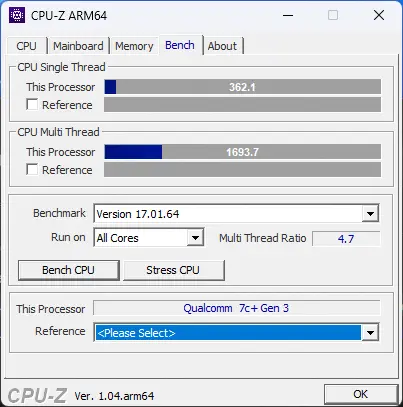
- Here we reach single-core score of 326.1 and a multi-core score of 1693.7 which compared to the Intel N100 (SC: 382 | MC: 1299) is a little bit slower on the single core but over 26% faster on the multi core benchmark.
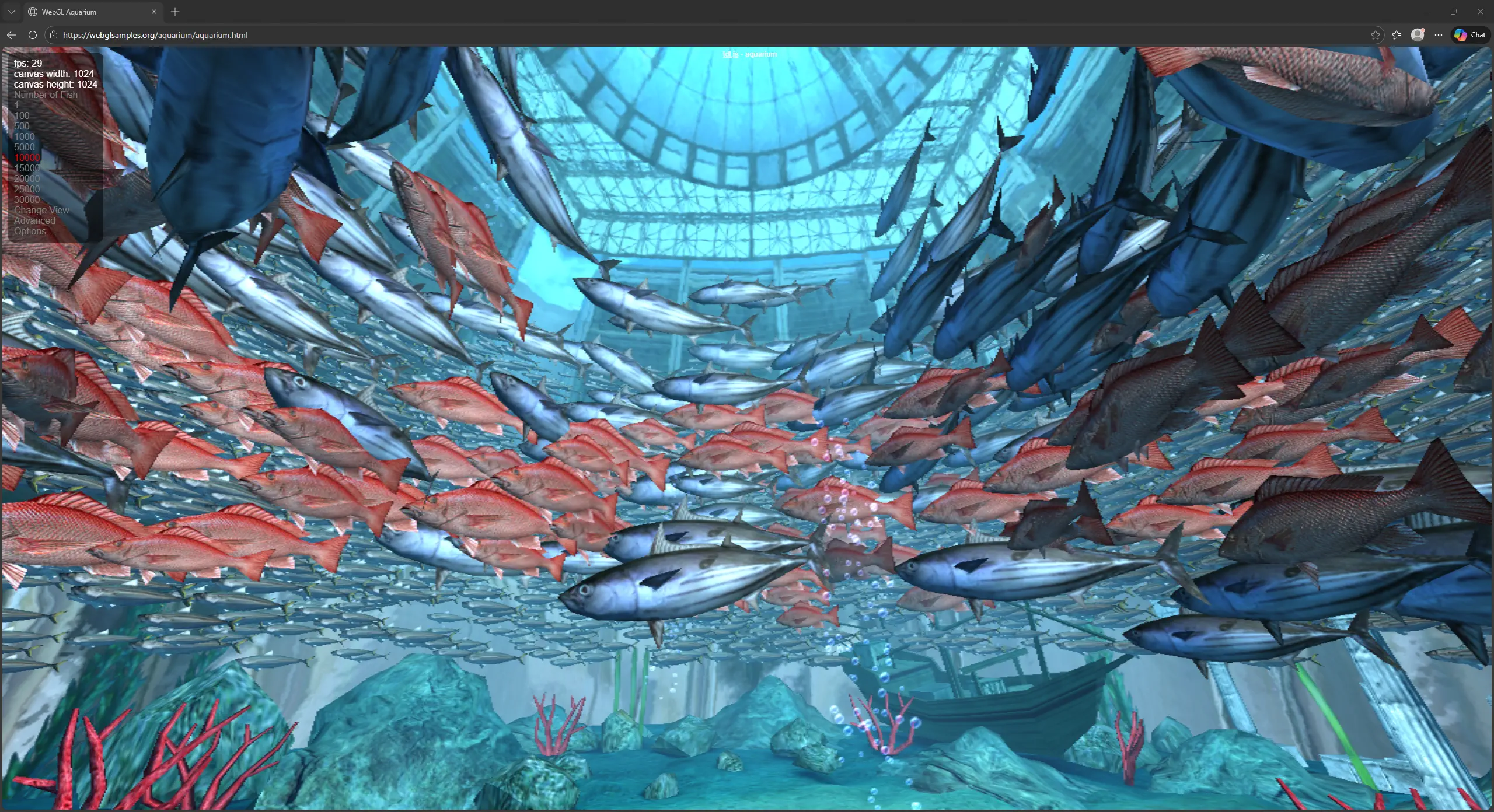
WebGL Aquarium:#
- 10.000 fishes @ 29-32 FPS
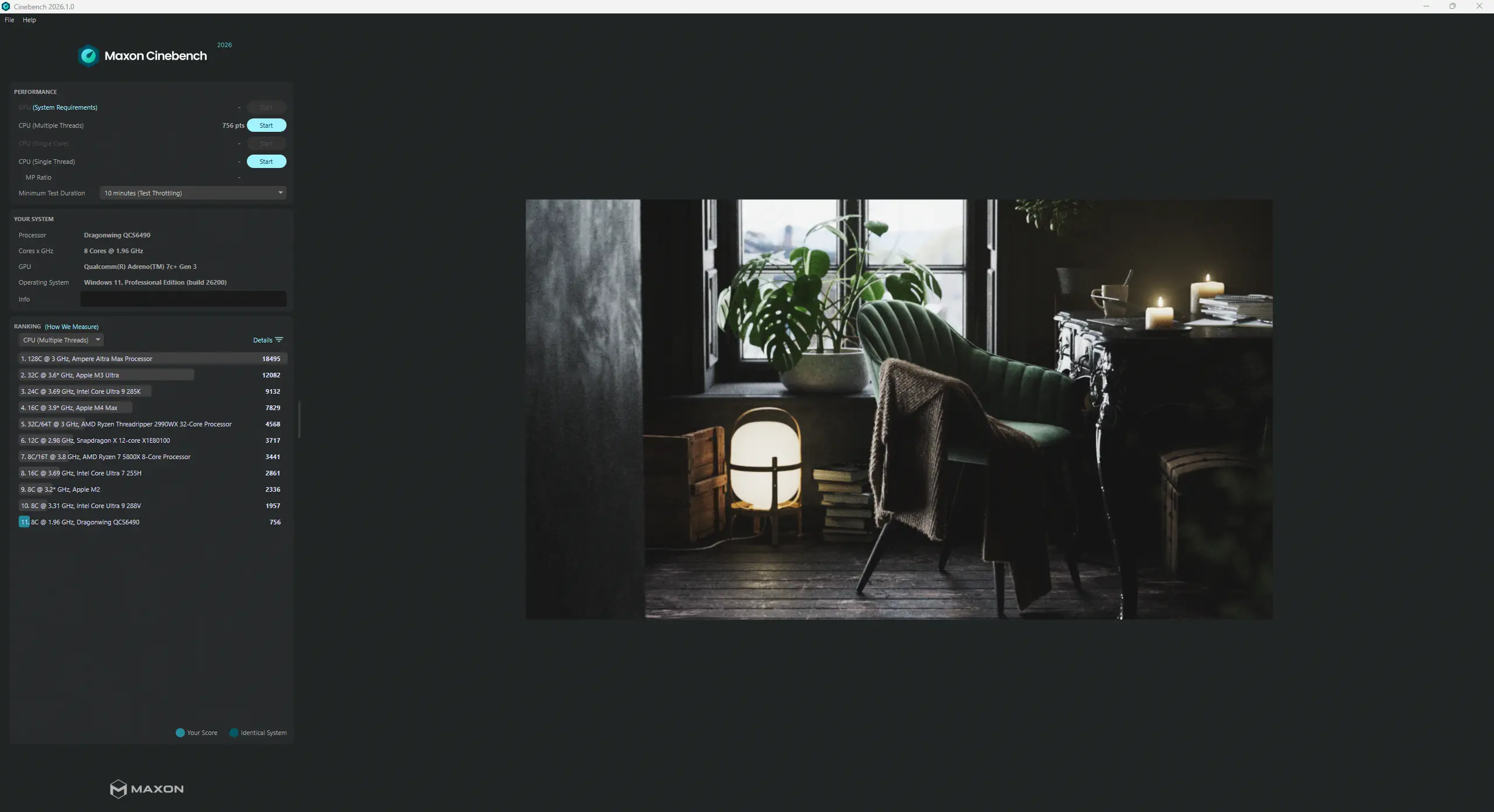
CineBench 2026:#
- Score: 756 Points.
Which makes this CPU only 3 times slower than an Apple M2, not bad! And I was not even sure if it would run or finish this benchmark. - But it did hit 94 degrees Celsius here so maybe with better cooling one can achieve an even higher score
Conclusion#
I think Raspberry Pi finally got some competition here from Radxa that actually shows that low power consumption does not have to equal low performance and that they’re not the only ones that can deliver on the software front but can even excel with first class Windows on Arm support which is something not really been done to this extent anywhere else especially if you keep the sub 100€ price in mind. But while Radxa is moving fast there are things they didn’t give enough attention to like that this board is missing an official cooling solution / case which this SoC demands. I also wished this board would have had a full size M.2 2280 slot as the smaller form factor SSDs are pricier in a market that already has rising prices for tech. Maybe at Embedded World 2026 in March we will see Radxa’s answer to my demands. A compute module form factor board is apparently confirmed and on the way and my hope is that a Q6B+ like their Rock5B+ can pick up the (small) crumbs left by this single board computer.
But what do you think about the Radxa Dragon Q6A? Have you tried it or are you thinking of buying it? Let me know in the comments and if there is anything else you would like to know about this board let me know that in the comments too.
Don’t forget to subscribe to our RSS feed and follow us on X/Twitter to always stay up to date!
Author: Mecid Urganci
I'm a full time Applied Cognitive and Media science student who in his free time loves to tinker. This sparked an interest in embedded hardware, which I try to make more accessible with this platform I created "SBCwiki".You can find me on X/Twitter at @mecoscorner and GitHub at @HeyMeco